Friday, 29 June 2012

Animated Gif in Email

I have recently seen an increase in Animated gifs in email. So I decided to test the following animated gif against a static gif to see if it increased the click through rate.
The animated gif did not make any difference to CTR, both the email with the static gif and the animated gif had an almost identical CTR %. 


So I may use animated gifs in the future, but only really for a design purpose. One thing to bear in mind is that Outlook 2007 onwards does not support animated gifs (not surprising!), instead the first transition shows as a normal static image. 

Wednesday, 16 May 2012

Personalisation in Subject Lines


I recently tested 2 subject lines against each other to determine how much of an impact personalisation has on open rates. The personalisation fields I worked with were title and surname.

Subject 1: 
TITLE  SURNAME – Your 20% Holiday Discount

Subject 2:

Your 20% Holiday Discount

The result...
After 4 hours Subject 1 (with personalisation) achieved a 12% open rate which was 2% higher than Subject 2.


So personalisation does increase opens but I believe you will condition your customers not to open if you use it every week.

Thursday, 19 April 2012

Increasing Facebook Likes and Social Buzz through Email

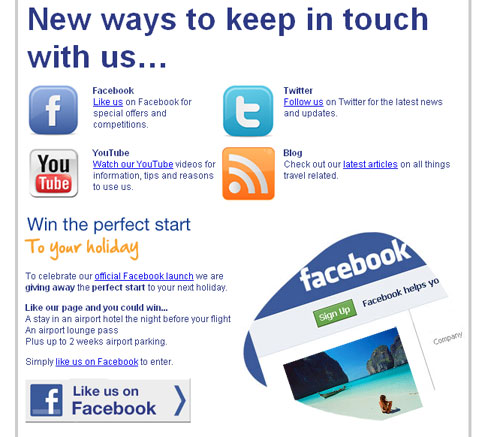
 We recently launched a Facebook campaign for a travel extras company with only 50 followers (mostly staff) and zero social buzz.

An email was created with a focus on the new ways to keep in touch, such as Facebook, twitter, youtube and the email was sent to the customer database. This campaign was not acquiring new customers, but instead increasing the interaction between company and customers through the new social channels.
A prize was also on offer for people that ‘like us’ on Facebook, this was only possible before the new timeline. The incentive and campaign was a success and increased likes to almost 2000 and the customers started immediately talking about the company on the page. 

Tips for a successful social email:

  • Keep it social – be brave and don’t use a sales message
  • Use a competition or incentive
  • Keep the email simple, clear and easy to digest
  • Show the benefits of connecting socially with you (watch our Youtube videos for tips on how to…)
  • Monitor and respond to all comments left as quickly as you can


Friday, 2 March 2012

Best day of the week to send emails

Have you wondered which is the best day of the week to send email marketing emails?
I recently tested the best day of the week and used open and click rate as the metric.


 Sunday, Saturday followed by Tuesday has the best open rate.


However Saturday also had one of the worst click through rates, suggesting to me people opened the email but did not click through. Sunday has the second largest click through rate and the largest open rate so must be the clear winner in this test.


Considerations..
Every week is different, 
A pay day may change behaviour
weather can have an impact


I believe school holidays made a difference to the above test as I sell a travel related service and this week of testing was one week before a half term holiday. I will retest again and I expect I will see different results on a different week.

Friday, 27 January 2012

Social media, QR codes & Lettuce


While unpacking my lettuce from my weekly shop, I noticed a QR code with ‘find us on facebook’ next to it. A simple way to integrate social media with the product packaging and the consumer.
 After scanning with a QR reader on a mobile device you are taken to this page...
 Like them for recipes etc. QR is also a fantastic way to build email opt-ins too.

Tuesday, 24 January 2012

Silverpop Engage Fundamentals Certification

I recently completed the Silverpop Engage Fundamentals Certification exam.
This is a fantastic way to educate marketers on Silverpop's services and functions, it also educates the user on best practice.


The exam consists of a multiple choice test of 100 questions, once this is passed you then have a practical exam. The practical exam is where you bring all your knowledge together to create lists, contact lists, a mailing with dynamic content, landing pages and more.
 

Sunday, 4 December 2011

Impressive Welcome Email

I recently made set up an account with a new website and i was really impressed by their welcome email...


What makes a great welcome email:
  1. Welcome the customer to your site, take it a step further and make them feel special and part of a community or family.
  2. Tell the customer who you are, what you are about, what you believe in, plus awards you may have. Keep it punchy, nobody wants to read boring corporate mission statements.
  3. Set expectations, how often will you email? Can they expect offers and latest products or news?
  4. Listen to what customers want, you have just introduced yourself, time to hear what they want to say. Provide email address, phone numbers or links to contact us web forms.
  5. Ask them to add your sender address to their address book or approved senders, there are no guarantees with deliverability, this email got through try and ensure the rest do.
  6. Be sociable... link to your Facebook, twitter, blog, you tube channel and any others.
  7. Unsubscribe, in the unlikely event they don’t want to hear from you again provide an unsubscribe link to an email preference centre.