Thursday, 13 September 2012

How to add Unicode Characters to a Subject Line

I recently found adding a Unicode symbol to the subject line increases my open rates. I have also noted it is becoming more popular. But how do you add these symbols?

To be honest I think you just have to try, it appears to be different in every ESP. This is how I added one...

First thing to do is find the Unicode symbol you want to use. Go to all programs, Accessories, System tools, character map.


Once in the character map choose Arial Unicode MS and choose your character. 


In the above example I have chosen a heart, you can see the character and at the bottom the character code U+2764.
Try copy and pasting the heart into your subject line and send a test, if not try and type the code into the subject and send a test. 

I use Silverpop and I had to us an email encoder to get the Unicode symbol to display. I visited this link and pasted in the heart character along with my subject line text. http://cs.silverpop.com/encoder/wizard.php


Result:
=?utf-8?B?4pmlIGhhcHB5IHZhbGVudGluZXMgZGF5?=
Display Example:
♥ happy valentines day


Friday, 17 August 2012

How to get more people to forward your email


Many ESP’s offer a function to forward the email to a friend and report on the number that did so. I always include a ‘forward to a friend’ option on my promotional emails, but decided to experiment and see if I could increase the number of forwards by amending the creative.
I usually place a forward to a friend button in the top right hand corner of the email, up in a prominent area in the header.

I did a split test: One mailing using its usual position, the second mailing using the usual position and a dedicated section in the email body...


The above screen grab shows how I made the forward more of feature, and it did increase the number of forwards.

RESULTS (% of opens that used the forward feature):
Standard forward (button in header) - 0.07%
Feature forward (button in header + dedicated section) - 0.17% 


The feature forward had a 61.7% increase in the number of people that forwarded it. 


Friday, 20 July 2012

A New Email Template Created for a Client

I recently designed this email template for a UK parking company, I'm not sure if they are going to use it yet but I had fun making it. This template design is based on their website theme, I simply took elements and re-packaged it in the email design. The design is simple, clean and clear.

Creating html emails from design is my favourite part of being an email marketer, I like getting my hands dirty with Photoshop and html code...

Friday, 6 July 2012

Using Unicode Symbols in Email Subject Lines

I recently tested using a Unicode symbol in an email subject line to see if it made any difference to the open rate %.

The subject lines I tested:


✈ Save 20% on your Next Flights

Save 20% on your Next Flights

The results after 3 days were...

✈ Save 20% on your Next Flights - 19.00% open rate
Save 20% on your Next Flights - 17.85% open rate

So a 1.15% increase in opens, not game changing but putting something new in your subject line is likely to 
surprise your audience and increase opens. Use with care, if used to frequently  people will soon get used to seeing them on your emails.

Friday, 29 June 2012

Animated Gif in Email

I have recently seen an increase in Animated gifs in email. So I decided to test the following animated gif against a static gif to see if it increased the click through rate.
The animated gif did not make any difference to CTR, both the email with the static gif and the animated gif had an almost identical CTR %. 


So I may use animated gifs in the future, but only really for a design purpose. One thing to bear in mind is that Outlook 2007 onwards does not support animated gifs (not surprising!), instead the first transition shows as a normal static image. 

Wednesday, 16 May 2012

Personalisation in Subject Lines


I recently tested 2 subject lines against each other to determine how much of an impact personalisation has on open rates. The personalisation fields I worked with were title and surname.

Subject 1: 
TITLE  SURNAME – Your 20% Holiday Discount

Subject 2:

Your 20% Holiday Discount

The result...
After 4 hours Subject 1 (with personalisation) achieved a 12% open rate which was 2% higher than Subject 2.


So personalisation does increase opens but I believe you will condition your customers not to open if you use it every week.

Thursday, 19 April 2012

Increasing Facebook Likes and Social Buzz through Email

 We recently launched a Facebook campaign for a travel extras company with only 50 followers (mostly staff) and zero social buzz.

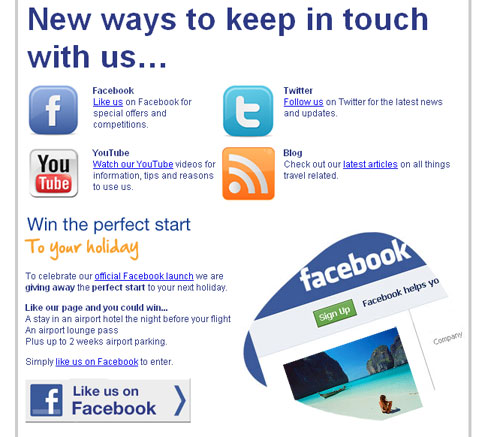
An email was created with a focus on the new ways to keep in touch, such as Facebook, twitter, youtube and the email was sent to the customer database. This campaign was not acquiring new customers, but instead increasing the interaction between company and customers through the new social channels.
A prize was also on offer for people that ‘like us’ on Facebook, this was only possible before the new timeline. The incentive and campaign was a success and increased likes to almost 2000 and the customers started immediately talking about the company on the page. 

Tips for a successful social email:

  • Keep it social – be brave and don’t use a sales message
  • Use a competition or incentive
  • Keep the email simple, clear and easy to digest
  • Show the benefits of connecting socially with you (watch our Youtube videos for tips on how to…)
  • Monitor and respond to all comments left as quickly as you can